Friday, March 31, 2023

Deletion

The delete_one function deletes a single document from the MongoDB collection. Previously we had inserted the document for a user named Mike. Let’s have a look at the MongoDB document inserted:

table.find_one({'name':'Mike'})


We will now delete this MongoDB document:

table.delete_one({'name':'Mike'})


Let’s try to fetch this document after deletion. If this document is not available in our MongoDB collection, the find_one function will return nothing.

table.find_one({'name':'Mike'}) Output: Nothing is returned.

Since we get nothing in return, it means that the MongoDB document doesn’t exist anymore.

As we saw that the insert_many function is used to insert multiple documents in MongoDB collection, delete_many is used to delete multiple documents at once. Let’s try to delete two MongoDB documents by the name field:

myquery = ({ "name":{"$in": ["Gyan","Eliot"]}})

x = table.delete_many(myquery)

print(x.deleted_count, " documents deleted.") 

Here, the deleted count stores the number of deleted MongoDB documents during the operation. The ‘$in’ is an operator in MongoDB.


Share:

Friday, March 17, 2023

Filter Conditions

We have seen how to fetch data from MongoDB using find and find_one functions. But, we don’t need to fetch all the documents all the time. This is where we apply some filter conditions.

Previously we have inserted a document to the MongoDB collection with the name  field as Gyan. Let’s see how to fetch that MongoDB document using the filter condition:

table.find_one({"name":'Gyan'})


mongodb python filter

Here, we have fetched the document using the name which is a string argument. On the other hand, we have seen in the previous example that final. inserted_ids contains the Ids of the inserted documents.

If we apply the filter condition on the _id field, it will return nothing because their datatype is ObjectId. This is not the built-in datatype. We need to convert the string value to ObjectId type to apply the filter condition on _id . So first, we will define a function to convert the string value then we will fetch the MongoDB document:

from bson.objectid import ObjectId

post_id=final.inserted_ids[0]

def parser(post_id):

    document = table.find_one({'_id': ObjectId(post_id)})

    return document

parser(post_id)


Share:

Tuesday, February 21, 2023

Insertion Function

insert_one function can be used to insert one document at a time in MongoDB. We will first create a dictionary and then insert it into the MongoDB database:

post = {"_id": 'qwertyui123456',

        'username': 'someone', 

        'name':'Gyan', 

        'address':'Somewhere in India'}


post_id = table.insert_one(post).inserted_id

post_id

Output: qwertyui123456 


MongoDB is an unstructured database so it is not necessary that all the documents in a collection will follow the same structure. For example, the dictionary we inserted in the above case does not contain a few of the fields we have seen in the MongoDB document we fetched earlier.

.inserted_id provides the _id field assigned by default if it has not been provided in the dictionary. In our case, we have explicitly provided this field. Finally, the operation returns the _id of the inserted MongoDB document. It is stored in the post_id variable in the above case. 

So far, we had to insert only one document in the MongoDB collection. What should we do if we have to insert thousands of documents at once? Will you run insert_one in a loop? Not at all!

We have the insert_many function for this:

import datetime

new_posts = [{"name": "Mike",

            "username": "latestpost!",

            "date": datetime.datetime(2009, 11, 12, 11, 14)},

            {"name": "Eliot",

            "title": "onceAgain",

            "text": "and pretty easy too!",

            "date": datetime.datetime(2009, 11, 10, 10, 45)}]


final = table.insert_many(new_posts)

final.inserted_ids


We have imported the datetime library because there is no built-in datatype for date and time in Python. This library will help us to assign the values of datetime type. In the above case, we have inserted a list of dictionaries in the MongoDB database. Each element is inserted as an independent document in the MongoDB collection.

Share:

Friday, February 17, 2023

Retrieving / Fetching the Data

We can query MongoDB using a dictionary-like notation or the dot operator in PyMongo. In the previous section, we used the dot operator to access the MongoDB database. Here, we will also see a demonstration of a dictionary-like syntax.

First, let’s fetch a single document from the MongoDB collection. We’ll use the find_one function for this purpose:

table.find_one()


We can see that the function has returned a dictionary. Let’s see the keys of this dictionary and then I will explain the purpose of each key.

first_instance.keys()


We can see some of the keys are self-explanatory. Let me explain what each of these keys is storing:

  • _id: MongoDB assigns a unique Id to each document
  • username: It contains the username of the user
  • name: The name of the user
  • address: Address of the user is stored in this field
  • birthdate: This argument stores the Date of Birth of the user
  • email: This is the email id of a given user
  • active: This field tells whether the user is active or not
  • accounts: It stores the list of all the accounts held by a given user. A user can have multiple accounts
  • teir_and_details: The category (silver, gold, etc.) is stored in this argument. This field also stores the benefits they are entitled to

Now, let’s see an example of dictionary-like access for MongoDB. Let’s fetch the name of the customer from the MongoDB document:

first_instance['name']

We can also use the find function to fetch the documents. find_one fetches only one document at a time. On the other hand, find can fetch multiple documents from the MongoDB collection:

table.find().sort("_id",pymongo.DESCENDING)

Here, the sort function sorts the documents in the descending order of _id.

Share:

Tuesday, February 14, 2023

PyMongo and MongoDB

PyMongo is a Python library that enables us to connect with MongoDB. It allows us to perform basic operations on the MongoDB database.

So, why Python? It’s a valid question.

We have chosen Python to interact with MongoDB because it is one of the most commonly used and considerably powerful languages for data science. PyMongo allows us to retrieve the data with dictionary-like syntax.

We can also use the dot notation to access MongoDB data. Its easy syntax makes our job a lot easier. Additionally, PyMongo’s rich documentation is always standing there with a helping hand. We will use this library for accessing MongoDB.

MongoDB is available for Linux, Windows and Mac OS X operating systems. Once you have installed the database, you need to start the mongod service. It’s time to fire up your Python notebook and get coding! We have a solid idea of MongoDB – let’s put that knowledge into action.

We will be performing a few key basic operations on a MongoDB database in Python using the PyMongo library.Connecting to the Database

To retrieve the data from a MongoDB database, we will first connect to it. Write and execute the below code in your Jupyter cell in order to connect to MongoDB:

import pymongo 

import pprint

mongo_uri = "mongodb://localhost:27017/"  

client = pymongo.MongoClient(mongo_uri)


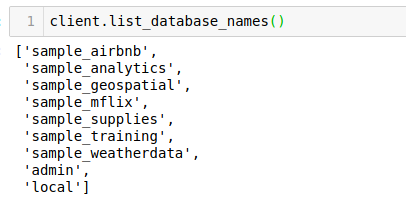
Let’s see the available databases:

client.list_database_names()

We will use the sample_analytics database for our purpose. Let’s set the cursor to the same database:

db = client.sample_analytics

The list_collection_names command shows the names of all the available collections:

db.list_collection_names()


Let’s see the number of customers we have. We will connect to the customers collection and then print the number of documents available in that collection:

table=db.customers 

table.count_documents({}) #gives the number of documents in the table

Output: 500

Here, we can see that we have the data for 500 customers. Next, we will fetch a MongoDB document from this table and see what information is present there.


Share:

Saturday, February 11, 2023

Understanding the Problem Statement

Let’s understand the problem we’ll be solving in future. This will give you a good idea of the kind of projects you can pick up to further hone your MongoDB in Python skills.

Suppose you are working for a banking system that provides an application to the customers. This app sends data to your MongoDB database. This data is stored in three collections:

  • The accounts collection contains information about all the accounts
  • The customers collection contains information about a customer
  • Finally, the transactions collection contains the customer transactions data

I have taken the sample database from MongoDB Atlas, a global cloud database service. We will use the ‘sample_analytics’ database to work on this problem statement. This database contains data related to financial services.

Share:

Tuesday, January 17, 2023

The Challenge with Structured Databases

We are generating data at an unprecedented pace right now. The scale and size of this data – it’s mind-boggling! Just check out these numbers:

  • Facebook generates four petabytes of data in just one day
  • Google generates twenty petabytes of data every day
  • Furthermore, Large Hadron Collider (27 kilometers long most powerful particle accelerator of the world) generates one petabyte of data per second. Most importantly this data is unstructured

Can you imagine using SQL to work with this volume of data? It’s setting yourself up for a nightmare!

SQL is a wonderful language to learn as a data scientist and it does work well when we’re dealing with structured data. But if your organization works with unstructured data, SQL databases can not fulfill the requirements.

Structured databases have two major disadvantages:

  • Scalability: It is very difficult to scale as the database grows larger
  • Elasticity: Structured databases need data in a predefined format. It the data is not following the predefined format, relational databases do not store it

So how do we solve this issue? If not SQL then what?

This is where we go for unstructured databases. Among a wide range of such databases, MongoDB is widely used because of its rich query language and quick access with concepts like indexing. In short, MongoDB is best suited for managing big data. Let’s see the difference between structured and unstructured databases:

Structured DatabasesUnstructured Databases
Structure:Every element has the same number of attributesDifferent elements can have different number of attributes.
Latency:Comparatively slower storageFaster storage
Ease of learning:Easy to learnComparatively tougher to learn
Storage Volume:Not appropriate for storing Big DataCan handle Big Data as well
Type of Data Stored:Generally textual data is storedAny type of data can be stored (Audio, Video, Clickstraem etc)
Examples:MySQL, PostgreSQLMongoDB, RavenDB


This article is the ultimate guide to get started with MongoDB using Python. In the coming posts we will demonstrate various operations on MongoDB with the help of examples and the PyMongo library.


Share:

Friday, January 6, 2023

Linear Regression

It is used to estimate real values (cost of houses, number of calls, total sales etc.) based on continuous variable(s). Here, we establish the relationship between independent and dependent variables by fitting the best line. This best fit line is known as the regression line and is represented by a linear equation Y= a *X + b.

The best way to understand linear regression is to relive this experience of childhood. Let us say, you ask a child in fifth grade to arrange people in his class by increasing the order of weight, without asking them their weights! What do you think the child will do? He/she would likely look (visually analyze) at the height and build of people and arrange them using a combination of these visible parameters. This is linear regression in real life! The child has actually figured out that height and build would be correlated to weight by a relationship, which looks like the equation above.

In this equation:

  • Y – Dependent Variable
  • a – Slope
  • X – Independent variable
  • b – Intercept

These coefficients a and b are derived based on minimizing the sum of the squared difference of distance between data points and the regression line.

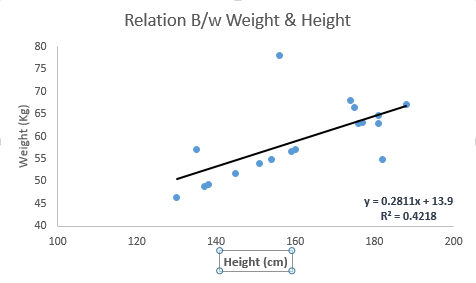
Look at the below example. Here we have identified the best fit line having linear equation y=0.2811x+13.9. Now using this equation, we can find the weight, knowing the height of a person.

Linear_Regression | machine learning algorithms

Linear Regression is mainly of two types: Simple Linear Regression and Multiple Linear Regression. Simple Linear Regression is characterized by one independent variable. And, Multiple Linear Regression(as the name suggests) is characterized by multiple (more than 1) independent variables. While finding the best fit line, you can fit a polynomial or curvilinear regression. And these are known as polynomial or curvilinear regression. 

Share:

MongoDB

MongoDB is an unstructured database. It stores data in the form of documents. MongoDB is able to handle huge volumes of data very efficiently and is the most widely used NoSQL database as it offers rich query language and flexible and fast access to data.

Let’s take a moment to understand the architecture of a MongoDB database.

The Architecture of a MongoDB Database

The information in MongoDB is stored in documents. Here, a document is analogous to rows in structured databases.

  • Each document is a collection of key-value pairs
  • Each key-value pair is called a field
  • Every document has an _id  field, which uniquely identifies the documents
  • A document may also contain nested documents
  • Documents may have a varying number of fields (they can be blank as well)

These documents are stored in a collection. A collection is literally a collection of documents in MongoDB. This is analogous to tables in traditional databases.

Unlike traditional databases, the data is generally stored in a single collection in MongoDB, so there is no concept of joins (except $lookup operator, which performs left-outer-join like operation). MongoDB has the nested document instead. 

Share:

Wednesday, January 4, 2023

Machine Learning Algorithms


1. Supervised Learning Algorithms

How it works: This algorithm consists of a target/outcome variable (or dependent variable) which is to be predicted from a given set of predictors (independent variables). Using this set of variables, we generate a function that map inputs to desired outputs. The training process continues until the model achieves a desired level of accuracy on the training data. Examples of Supervised Learning: Regression, Decision Tree, Random Forest , KNN, Logistic Regression etc.


2. Unsupervised Learning Algorithms

How it works: In this algorithm, we do not have any target or outcome variable to predict / estimate. It is used for clustering populations in different groups, which is widely used for segmenting customers into different groups for specific interventions. Examples of Unsupervised Learning: Apriori algorithm, K-means.


3. Reinforcement Learning:

How it works: Using this algorithm, the machine is trained to make specific decisions. It works this way: the machine is exposed to an environment where it trains itself continually using trial and error. This machine learns from past experience and tries to capture the best possible knowledge to make accurate business decisions. Example of Reinforcement Learning: Markov Decision Process

Here is the list of commonly used machine learning algorithms. These algorithms can be applied to almost any data problem:

  1. Linear Regression
  2. Logistic Regression
  3. Decision Tree
  4. SVM
  5. Naive Bayes
  6. kNN
  7. K-Means
  8. Random Forest
  9. Dimensionality Reduction Algorithms
  10. Gradient Boosting algorithms
    1. GBM
    2. XGBoost
    3. LightGBM
    4. CatBoost
Share:

Monday, January 2, 2023

Components of a Time Series Forecasting in Python

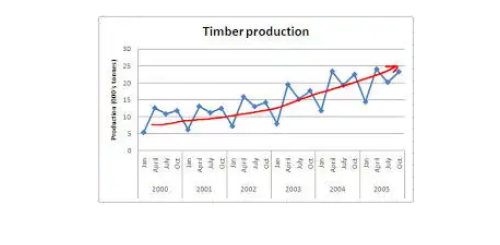
 1. Trend: A trend is a general direction in which something is developing or changing. So we see an increasing trend in this time series. We can see that the passenger count is increasing with the number of years. Let’s visualize the trend of a time series:


Trend

Example

Here the red line represents an increasing trend of the time series.

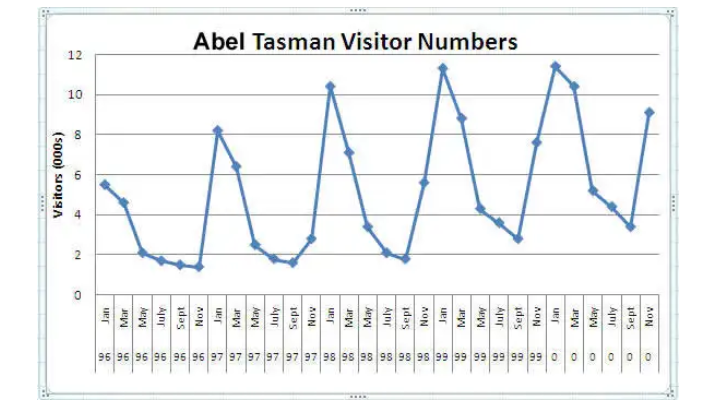
2. Seasonality:–  Another clear pattern can also be seen in the above time series, i.e., the pattern is repeating at a regular time interval which is known as the seasonality. Any predictable change or pattern in a time series that recurs or repeats over a specific time period can be said to be seasonality. Let’s visualize the seasonality of the time series:

Seasonality


Example

We can see that the time series is repeating its pattern after every 12 months i.e there is a peak every year during the month of January and a trough every year in the month of September, hence this time series has a seasonality of 12 months.

Difference Between a Time Series and Regression Problem

Here you might think that as the target variable is numerical it can be predicted using regression techniques, but a time series problem is different from a regression problem in the following ways:

  • The main difference is that a time series is time-dependent. So the basic assumption of a linear regression model that the observations are independent doesn’t hold in this case.
  • Along with an increasing or decreasing trend, most Time Series have some form of seasonality trends,i.e. variations specific to a particular time frame.


So, predicting a time series using regression techniques is not a good approach.

Time series analysis comprises methods for analyzing time-series data in order to extract meaningful statistics and other characteristics of the data. Time series forecasting is the use of a model to predict future values based on previously observed values.

Share: