Monday, June 5, 2023

The math module - trigonometric functions

 Some of the trigonometric functions defined in the math module are as follows:

import math

# calculate arc tangent in radians

print ("atan(0) : ",math.atan(0))

print("**************")

# cosine of x

print ("cos(90) : ",math.cos(0))

print("**************")

# calculate hypotenuse

print ("hypot(3,6) : ",math.hypot(3,6))

print("**************")

# calculates sine of x

print ("sin(0) : ", math.sin(0))

print("**************")

# calculates tangent of x

print ("tan(0) : ",math.tan(0))

print("**************")

# converts radians to degree

print ("degrees(0.45) : ",math.degrees(0.45))

print("**************")

# converts degrees to radians

print ("radians(0) : ",math.radians(0))

OUTPUT

atan(0) : 0.0

**************

cos(90) : 1.0

**************

hypot(3,6) : 6.708203932499369

**************

sin(0) : 0.0

**************

tan(0) : 0.0

**************

degrees(0.45) : 25.783100780887047

**************

radians(0) : 0.0

>>>

Share:

Friday, June 2, 2023

The math module - Mathematical functions

Mathematical functions are defined in the math module. You will have to import the math module to get access to all its functions.

import math

#ceiling value

a = -52.3

print ("math ceil for ",a, " is : ", math.ceil(a))

print("********************")

#exponential value

a = 2

print("exponential value for ", a, " is: ",math.exp(2))

print("********************")

#absolute value of x

a = -98.4

print ("absolute value of ",a," is: ",abs(a))

print("********************")

#floor values

a = -98.4

print ("floor value for ",a," is: ", math.floor(a))

print("********************")

# log(x)

a = 10

print ("log value for ",a," is : ", math.log(a))

print("********************")

# log10(x)

a = 56

print ("log to the base 10 for ",a," is : ",math.log10(a))

print("********************")

# to the power of

a = 2

b = 3

print (a," to the power of ",b," is : ",math.pow(2,3))

print("********************")

# square root

a = 2

print("sqaure root")

print ("Square root of ",a," is : ", math.sqrt(25))

print("********************")

OUTPUT

math ceil for -52.3 is : -52

********************

exponential value for 2 is: 7.38905609893065

********************

absolute value of -98.4 is: 98.4

********************

floor value for -98.4 is: -99

********************

log value for 10 is : 2.302585092994046

********************

log to the base 10 for 56 is : 1.7481880270062005

********************

2 to the power of 3 is : 8.0

********************

sqaure root

Square root of 2 is : 5.0

********************

Share:

Monday, May 29, 2023

Strings in-built or predefined methods

All objects in Python whether strings, tuples, lists, and so on have some inbuilt methods that they are associated with. People often get confused between a method and a function and many think that it is one and the same thing but the fact is that in Python there is a difference between the methods and functions. Functions have parenthesis and arguments and when these functions get associated with an object they become a method.

Few interesting features:

Whenever, you type a dot ‘.’ operator in front of an object, the idle displays all the methods that can be associated with it. 


You will initially work with the following:

help()

find()

upper()

lower()

strip()

replace()

split()

join()

in and not in (These are membership operator and not methods)

endswith()

You can use dir(str) method to see all the methods associated with string objects.


1. help()

To find complete information about any method use help() function.


The help() function applies to all Python objects.

2. find() 

The find() method will return the lowest index in the string where the desired substring exists.

S.find(sub[, start[, end]])

Where, S is the string, sub is the substring that you are looking for. Arguments in the square brackets are not mandatory.

>>>#find()

>>> x = 'Last Section of the Chapter'

>>> x.find('ast')

1

>>>

3. upper()

This method converts the entire string into upper case.

>>>#upper()

>>> x = 'Last Section of the Chapter'

>>> x.upper()

'LAST SECTION OF THE CHAPTER'

>>>

4. lower()

This method converts entire string into lowercase.

>>>#lower()

>>> x = 'Last Section of the Chapter'

>>> x.lower()

'last section of the chapter'

>>>

5. strip()

This method removes whitespaces or a particular character from a string.

>>> #strip()

>>> money = '$100'

>>> money.strip('$')

'100'

6. replace()

This method removes a character or substring in a string with some other character or string.

>>> #replace()

>>> str1 = 'Happy Chrsitmas'

>>> str1.replace('Happy','Merry')

'Merry Chrsitmas'

>>>

7. split()

This splits a string into a list data type based on the character that is passed as an argument.

>>> #split()

>>> x = 'Last Section of the Chapter'

>>> x.split()

['Last', 'Section', 'of', 'the', 'Chapter']

>>> ip ='222:222:0:02'

>>> ip.split(':')

['222', '222', '0', '02']

>>>

8. join()

Opposite of string.

>>> #join()

>>> student = ['Alex','32','Physics Major', 'Baseball']

>>> ('|').join(student)

'Alex|32|Physics Major|Baseball'

>>>

9. in and not in

Checks if a substring is a part of the string or not.

>>> #in

>>> x = 'Merry Christmas'

>>> 'Meery' in x

False

>>> 'Merry' in x

True

>>> #not in

>>> 'year' not in x

True

>>> 'Christmas' not in x

False

>>>

10. endswith()

This method is used to check if the string ends with a particular string or not.

>>> #endswith()

>>> x = 'Merry Christmas'

>>> x.endswith()

>>> x.endswith('as')

True

>>>

Share:

Wednesday, May 3, 2023

Converting Unstructured Data to Structured Form

As a data scientist, you not only need to fetch the data but also analyze it. Storing the data in a structured form simplifies this task. In this section, we will learn how to convert the data fetched from MongoDB into a structured format.

Storing into a Dataframe

The find function returns a dictionary from a MongoDB collection. You can directly insert it into a dataframe. First, let’s fetch 100 MongoDB documents and then we will store these documents into a dataframe:

import pandas as pd

samples=table.find().sort("_id",pymongo.DESCENDING)[:100]

df=pd.DataFrame(samples)

df.head()


The readability of this dataframe is far better than that of the default format returned by the function.

Writing to a File


Pandas dataframes can directly be exported into CSV, Excel or SQL. Let us try to store this data to a CSV file:

df.to_csv('StructuredData.csv',index=False)

Similarly, you can use the to_sql function to export the data into a SQL database.
Share:

Wednesday, April 5, 2023

Creating Database and Collection

The creation of any database and collection is a very simple process in MongoDB. You can use the syntax of retrieval to do this. If you try to access a database which doesn’t exist, MongoDB will create it for you.

Let’s create a database and a collection:

mydb=client.testDB

mycoll=mydb.testColl

The MongoDB database has been created here but if we run list_database_names, this database will not be listed. MongoDB doesn’t show empty databases. So, we will have to insert something there. Let’s insert a document in the MongoDB collection:

testInsert=mycoll.insert_one({"country":'India'}).inserted_id

client.list_database_names()


Now we can see that our database is available in the list of MongoDB databases.

Share:

Friday, March 31, 2023

Deletion

The delete_one function deletes a single document from the MongoDB collection. Previously we had inserted the document for a user named Mike. Let’s have a look at the MongoDB document inserted:

table.find_one({'name':'Mike'})


We will now delete this MongoDB document:

table.delete_one({'name':'Mike'})


Let’s try to fetch this document after deletion. If this document is not available in our MongoDB collection, the find_one function will return nothing.

table.find_one({'name':'Mike'}) Output: Nothing is returned.

Since we get nothing in return, it means that the MongoDB document doesn’t exist anymore.

As we saw that the insert_many function is used to insert multiple documents in MongoDB collection, delete_many is used to delete multiple documents at once. Let’s try to delete two MongoDB documents by the name field:

myquery = ({ "name":{"$in": ["Gyan","Eliot"]}})

x = table.delete_many(myquery)

print(x.deleted_count, " documents deleted.") 

Here, the deleted count stores the number of deleted MongoDB documents during the operation. The ‘$in’ is an operator in MongoDB.


Share:

Friday, March 17, 2023

Filter Conditions

We have seen how to fetch data from MongoDB using find and find_one functions. But, we don’t need to fetch all the documents all the time. This is where we apply some filter conditions.

Previously we have inserted a document to the MongoDB collection with the name  field as Gyan. Let’s see how to fetch that MongoDB document using the filter condition:

table.find_one({"name":'Gyan'})


mongodb python filter

Here, we have fetched the document using the name which is a string argument. On the other hand, we have seen in the previous example that final. inserted_ids contains the Ids of the inserted documents.

If we apply the filter condition on the _id field, it will return nothing because their datatype is ObjectId. This is not the built-in datatype. We need to convert the string value to ObjectId type to apply the filter condition on _id . So first, we will define a function to convert the string value then we will fetch the MongoDB document:

from bson.objectid import ObjectId

post_id=final.inserted_ids[0]

def parser(post_id):

    document = table.find_one({'_id': ObjectId(post_id)})

    return document

parser(post_id)


Share:

Tuesday, February 21, 2023

Insertion Function

insert_one function can be used to insert one document at a time in MongoDB. We will first create a dictionary and then insert it into the MongoDB database:

post = {"_id": 'qwertyui123456',

        'username': 'someone', 

        'name':'Gyan', 

        'address':'Somewhere in India'}


post_id = table.insert_one(post).inserted_id

post_id

Output: qwertyui123456 


MongoDB is an unstructured database so it is not necessary that all the documents in a collection will follow the same structure. For example, the dictionary we inserted in the above case does not contain a few of the fields we have seen in the MongoDB document we fetched earlier.

.inserted_id provides the _id field assigned by default if it has not been provided in the dictionary. In our case, we have explicitly provided this field. Finally, the operation returns the _id of the inserted MongoDB document. It is stored in the post_id variable in the above case. 

So far, we had to insert only one document in the MongoDB collection. What should we do if we have to insert thousands of documents at once? Will you run insert_one in a loop? Not at all!

We have the insert_many function for this:

import datetime

new_posts = [{"name": "Mike",

            "username": "latestpost!",

            "date": datetime.datetime(2009, 11, 12, 11, 14)},

            {"name": "Eliot",

            "title": "onceAgain",

            "text": "and pretty easy too!",

            "date": datetime.datetime(2009, 11, 10, 10, 45)}]


final = table.insert_many(new_posts)

final.inserted_ids


We have imported the datetime library because there is no built-in datatype for date and time in Python. This library will help us to assign the values of datetime type. In the above case, we have inserted a list of dictionaries in the MongoDB database. Each element is inserted as an independent document in the MongoDB collection.

Share:

Friday, February 17, 2023

Retrieving / Fetching the Data

We can query MongoDB using a dictionary-like notation or the dot operator in PyMongo. In the previous section, we used the dot operator to access the MongoDB database. Here, we will also see a demonstration of a dictionary-like syntax.

First, let’s fetch a single document from the MongoDB collection. We’ll use the find_one function for this purpose:

table.find_one()


We can see that the function has returned a dictionary. Let’s see the keys of this dictionary and then I will explain the purpose of each key.

first_instance.keys()


We can see some of the keys are self-explanatory. Let me explain what each of these keys is storing:

  • _id: MongoDB assigns a unique Id to each document
  • username: It contains the username of the user
  • name: The name of the user
  • address: Address of the user is stored in this field
  • birthdate: This argument stores the Date of Birth of the user
  • email: This is the email id of a given user
  • active: This field tells whether the user is active or not
  • accounts: It stores the list of all the accounts held by a given user. A user can have multiple accounts
  • teir_and_details: The category (silver, gold, etc.) is stored in this argument. This field also stores the benefits they are entitled to

Now, let’s see an example of dictionary-like access for MongoDB. Let’s fetch the name of the customer from the MongoDB document:

first_instance['name']

We can also use the find function to fetch the documents. find_one fetches only one document at a time. On the other hand, find can fetch multiple documents from the MongoDB collection:

table.find().sort("_id",pymongo.DESCENDING)

Here, the sort function sorts the documents in the descending order of _id.

Share:

Tuesday, February 14, 2023

PyMongo and MongoDB

PyMongo is a Python library that enables us to connect with MongoDB. It allows us to perform basic operations on the MongoDB database.

So, why Python? It’s a valid question.

We have chosen Python to interact with MongoDB because it is one of the most commonly used and considerably powerful languages for data science. PyMongo allows us to retrieve the data with dictionary-like syntax.

We can also use the dot notation to access MongoDB data. Its easy syntax makes our job a lot easier. Additionally, PyMongo’s rich documentation is always standing there with a helping hand. We will use this library for accessing MongoDB.

MongoDB is available for Linux, Windows and Mac OS X operating systems. Once you have installed the database, you need to start the mongod service. It’s time to fire up your Python notebook and get coding! We have a solid idea of MongoDB – let’s put that knowledge into action.

We will be performing a few key basic operations on a MongoDB database in Python using the PyMongo library.Connecting to the Database

To retrieve the data from a MongoDB database, we will first connect to it. Write and execute the below code in your Jupyter cell in order to connect to MongoDB:

import pymongo 

import pprint

mongo_uri = "mongodb://localhost:27017/"  

client = pymongo.MongoClient(mongo_uri)


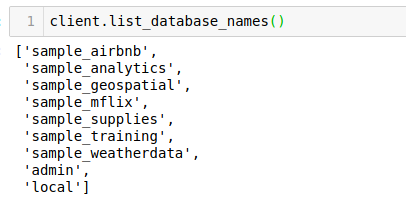
Let’s see the available databases:

client.list_database_names()

We will use the sample_analytics database for our purpose. Let’s set the cursor to the same database:

db = client.sample_analytics

The list_collection_names command shows the names of all the available collections:

db.list_collection_names()


Let’s see the number of customers we have. We will connect to the customers collection and then print the number of documents available in that collection:

table=db.customers 

table.count_documents({}) #gives the number of documents in the table

Output: 500

Here, we can see that we have the data for 500 customers. Next, we will fetch a MongoDB document from this table and see what information is present there.


Share:

Saturday, February 11, 2023

Understanding the Problem Statement

Let’s understand the problem we’ll be solving in future. This will give you a good idea of the kind of projects you can pick up to further hone your MongoDB in Python skills.

Suppose you are working for a banking system that provides an application to the customers. This app sends data to your MongoDB database. This data is stored in three collections:

  • The accounts collection contains information about all the accounts
  • The customers collection contains information about a customer
  • Finally, the transactions collection contains the customer transactions data

I have taken the sample database from MongoDB Atlas, a global cloud database service. We will use the ‘sample_analytics’ database to work on this problem statement. This database contains data related to financial services.

Share: